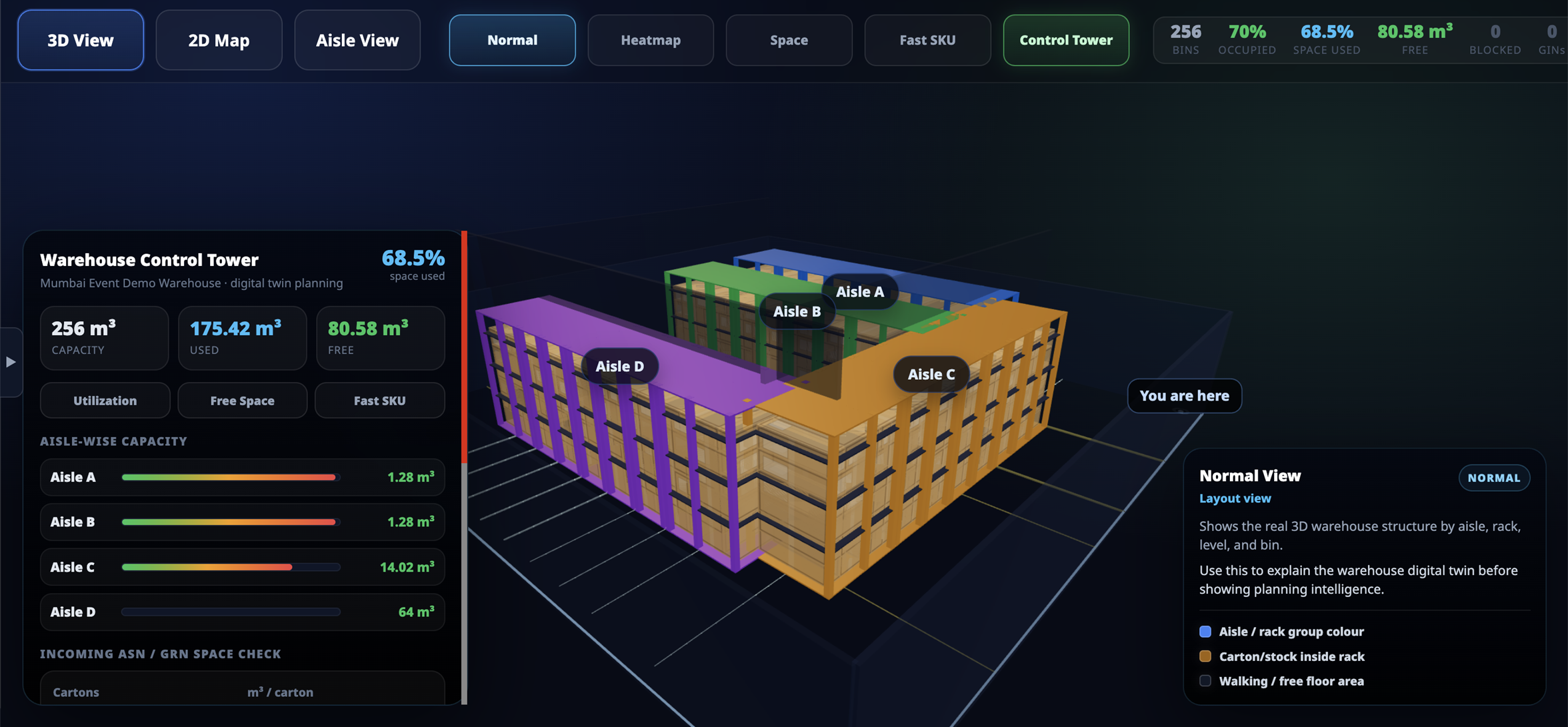
3D Warehouse Visual Navigator for Real-Time Warehouse Visibility

Myflowsoft 3D Warehouse Visual Navigator gives warehouse teams a live visual view of aisles, racks, bins, stock, free space, utilization, and movement. It helps managers see warehouse capacity, identify overloaded areas, plan putaway, and improve picking efficiency from one interactive 3D screen.

3D Warehouse Visual Navigator

Digital Twin View

See your complete warehouse layout in one live 3D screen.

  • Visualize aisles, racks, levels, and bin locations
  • View occupied, empty, and blocked locations
  • Track stock, reserved quantity, and available quantity

Turn warehouse data into a live visual control tower for faster decision-making.

Space Utilization

Know exactly how much warehouse space is used and available.

  • Track total, used, and free warehouse capacity
  • View bin-level and aisle-wise space utilization
  • Identify dead space and blocked storage areas

Plan storage better before renting extra space or expanding your warehouse.

Heatmap View

Identify overloaded and underutilized warehouse areas instantly.

  • Red, orange, yellow, green, and dark utilization indicators
  • Spot full aisles, free racks, and low-usage zones
  • Improve storage planning with color-based visibility

Quickly understand where stock is overloaded and where space is still available.

Smart GRN & Putaway Planning

Plan incoming stock placement before the truck arrives.

  • Suggest putaway based on volume, weight, and empty bins
  • Consider pickface, reserve, and same-item nearby locations
  • Reduce wrong putaway and unnecessary warehouse movement

Store incoming stock in the right location using real-time space availability.

Visual Pick Route Planning

Guide warehouse users to the right bin with a visual pick path.

  • Show source bin, pick location, and route path
  • Support multi-bin pick stops and travel visibility
  • Reduce picker confusion and walking time

Improve picking speed and execution accuracy with visual warehouse navigation.

Key Benefits of 3D Warehouse
Visual Navigator

space utilization

Better Space Utilization

View used space, free capacity, dead space, and blocked areas visually to improve warehouse planning.

putaway

Faster Putaway Decisions

Find suitable bins faster using available cubic space, zone rules, and stock placement logic.

picking

Improved Picking Efficiency

Use fast SKU visibility and route planning to reduce picker walking time and improve productivity.

visibility

Real-Time Warehouse Visibility

Connect with WMS and ERP operations to reflect actual stock, movement, GRN, GIN, and task activity.

Frequently asked questions:

  • What is Myflowsoft 3D Warehouse Visual Navigator?

    Myflowsoft 3D Warehouse Visual Navigator is a visual warehouse screen that displays aisles, racks, bins, stock, space utilization, heatmaps, and warehouse movement in an interactive 3D view.

  • How does it help warehouse managers?

    It helps managers quickly see used space, free capacity, overloaded aisles, empty bins, and movement status without depending only on reports or Excel sheets.

  • Can it show warehouse space utilization?

    Yes, it can show total warehouse capacity, used space, free space, bin-level utilization, aisle-wise free space, and blocked or unusable space.

  • Does it support heatmap view?

    Yes, the heatmap view uses color-based indicators to show critical, high, medium, healthy, and low-utilization areas inside the warehouse.

  • Can it help during GRN and putaway?

    Yes, it can support putaway planning by suggesting suitable aisles, racks, or bins based on available space, weight, zone, and stock location logic.

  • Does it support mixed warehouse layouts?

    Yes, it can support horizontal aisles, vertical aisles, mixed rack directions, multiple zones, pickface areas, reserve areas, bulk storage, staging, and dock areas.

  • Is it connected with Myflowsoft WMS and ERP?

    Yes, it can connect with Myflowsoft WMS and ERP operations such as GRN, GIN, stock on hand, pick list, place list, putaway tasks, stock movement, barcode scanning, and handheld devices.

  • Who should use this feature?

    It is useful for 3PL warehouses, manufacturing warehouses, distribution centers, retail warehouses, pharma warehouses, automotive spare parts warehouses, and warehouses planning to digitize operations.

Warehouse Visibility That Turns Layout Into Intelligence

Myflowsoft 3D Warehouse Visual Navigator helps warehouse teams move from manual visibility to visual warehouse intelligence. See aisles, racks, bins, stock, space utilization, heatmaps, free capacity, and pick routes from one powerful 3D control tower.

Visualize. Plan. Pick. Putaway. Optimize.

Book a Demo of Myflowsoft 3D Warehouse Visual Navigator